Resume Header Mistakes: Address, Photo, and Privacy
I've rejected resumes because of the header. Not the experience. Not the skills. The header.
Here's what happened: A candidate included their full street address. The address was in a neighborhood known for high crime. Did that affect my perception? It shouldn't have. But unconscious bias is real.
Another candidate included a photo. She was visibly pregnant. The hiring manager passed on her resume immediately. Legal? No. Common? Unfortunately, yes.
Your resume gets forwarded, uploaded to databases, and shared with dozens of people. Do you really want your home address floating around? Before you continue, make sure to optimize your resume header to maximize your job search success.
Your resume header is your first impression. And most people are screwing it up.
After reviewing 50,000+ resumes, here's exactly what belongs in your header—and what's costing you interviews.
Create an ATS-optimized resume with our professional templates
What Actually Belongs in Your Resume Header
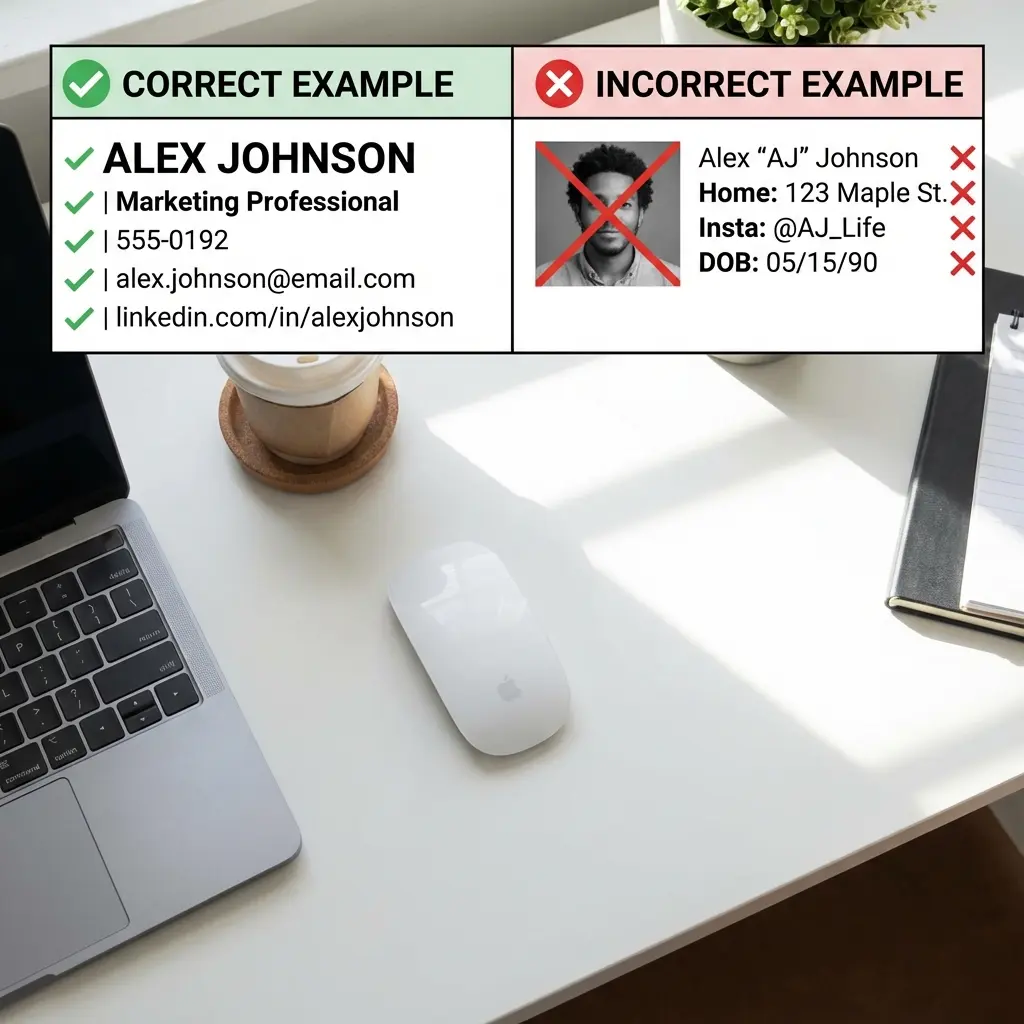
The essentials (in order of importance):
What to skip:
The Full Address Debate: Why You Should Skip It
The old rule: Always include your full mailing address.
The new rule: City and state only.
Why the change?
Reason #1: Privacy and Safety
Real risks:
- Identity theft
- Stalking (especially for women)
- Unwanted mail or visits
- Data breaches exposing your address
Reason #2: Location Discrimination
The bias: Recruiters make assumptions based on your address.
Examples I've seen:
- "That's a 90-minute commute. They'll quit in 6 months."
- "That neighborhood is rough. Cultural fit concern."
- "They live in the suburbs. Won't fit our urban startup vibe."
Is it legal? No. Does it happen? Yes.
Reason #3: It's Unnecessary
What recruiters actually need to know:
- Are you local or will you need relocation?
- What's your general commute situation?
City and state answers both questions.
Example:
❌ Wrong:
1234 Oak Street, Apartment 5B Austin, TX 78701
✅ Right:
Austin, TX
Exception: If you're applying for a remote role, you can skip location entirely or write "Remote" or "Open to Remote."
The Photo Problem: When to Include (and When to Run)
The rule varies by country:
United States, Canada, United Kingdom: NO PHOTO
Why?
- Triggers unconscious bias (race, age, gender, attractiveness)
- Legal liability for companies (discrimination claims)
- Many ATS systems auto-reject resumes with photos
- Professional norm is no photo
What happens if you include one?
Best case: They ignore it. Worst case: Your resume gets rejected to avoid bias claims.
I've seen companies reject resumes with photos as policy—even if the candidate was qualified.
Europe, Asia, Latin America, Middle East: PHOTO OFTEN EXPECTED
Countries where photos are standard:
- Germany, France, Spain, Italy
- China, Japan, South Korea, Singapore
- Brazil, Mexico, Argentina
- UAE, Saudi Arabia
If applying in these regions:
- Use a professional headshot (not a selfie)
- Neutral background
- Professional attire
- Friendly but professional expression
- High-quality image
When in doubt: Research the specific country's norms or ask a local recruiter.
Email Address: Your Silent Credibility Killer
The problem: Your email address says more about you than you think.
Red flags I've seen:
❌ sexybeast69@gmail.com
❌ partyboy2000@yahoo.com
❌ ihatemondays@hotmail.com
❌ john.smith.unemployed@gmail.com
Yes, these are real. Yes, they got rejected.
The fix:
✅ firstname.lastname@gmail.com
✅ firstnamelastname@gmail.com
✅ f.lastname@gmail.com
Pro tips:
- Use Gmail (most professional free option)
- Avoid AOL, Yahoo, Hotmail (dated)
- Don't use your current work email (unprofessional)
- Create a job-search-specific email if needed
LinkedIn URL: The Must-Have
Include your LinkedIn profile. Period.
Why it matters:
- 95% of recruiters will look you up on LinkedIn anyway
- Shows you're digitally literate
- Provides more context than a resume alone
- Signals you're serious about your career
How to format it:
❌ Wrong (default URL):
linkedin.com/in/john-smith-b4739284
✅ Right (customized URL):
linkedin.com/in/johnsmith
How to customize your LinkedIn URL:
- Go to your LinkedIn profile
- Click "Edit public profile & URL"
- Click "Edit your custom URL"
- Enter: firstname-lastname or firstnamelastname
Pro tip: Make sure your LinkedIn profile is updated and matches your resume before including the link.
Phone Number: The Basics
Include:
- Area code
- Full 10-digit number
- Professional voicemail greeting
Format options (all acceptable):
- (555) 123-4567
- 555-123-4567
- 555.123.4567
Don't:
- List multiple phone numbers (confusing)
- Use a work phone (unprofessional)
- Forget to check voicemail regularly
Voicemail tip: Record a professional greeting. "Hey, it's John, leave a message" is fine. Loud music or jokes? Not fine.
Portfolio/Website: When to Include
Include if:
- You're in a creative field (design, writing, photography)
- You're in tech (GitHub, personal projects)
- You have a professional portfolio site
- The website is relevant to the job
Don't include if:
- Your website is outdated or broken
- It's a personal blog about your hobbies
- The content is unprofessional
- You haven't updated it in 2+ years
Format:
Portfolio: johnsmith.com GitHub: github.com/johnsmith
Header Formatting: ATS-Friendly Design
The problem: Fancy headers break ATS systems.
What to avoid:
❌ Headers/footers (ATS can't read them) ❌ Text boxes ❌ Tables for layout ❌ Images or graphics ❌ Multiple columns in the header
What works:
✅ Simple, left-aligned text ✅ Clear hierarchy (name largest, contact info smaller) ✅ Standard fonts (Arial, Calibri, Times New Roman) ✅ Consistent spacing
Example of ATS-friendly header:
JOHN SMITH
Austin, TX | (555) 123-4567 | john.smith@gmail.com | linkedin.com/in/johnsmith
Or with line breaks:
JOHN SMITH
Austin, TX
(555) 123-4567 | john.smith@gmail.com
linkedin.com/in/johnsmith | johnsmith.com
Privacy Protection: What Never to Include
Never include on your resume:
Why this matters:
These details open you up to discrimination (illegal but it happens) and privacy risks.
International Resumes: Different Rules
If applying internationally, research local norms:
Europe (CV format):
- Often 2+ pages
- Photo usually expected
- Date of birth common
- More personal details
Asia:
- Photo expected
- Age and marital status common
- Education often comes first
- More formal tone
Middle East:
- Photo expected
- Nationality and visa status important
- Gender and marital status common
- References often required upfront
Australia/New Zealand:
- Similar to US/UK (no photo)
- City/state only
- LinkedIn expected
Frequently Asked Questions
Should I put my full address on my resume?
No. Include only your city and state (e.g., "Austin, TX"). Full street addresses are outdated, create privacy risks, and can trigger location-based discrimination. ATS systems and recruiters only need to know your general location.
Should I include a photo on my resume?
In the US, Canada, and UK: No. Photos can trigger unconscious bias and many companies reject resumes with photos to avoid discrimination claims. In Europe, Asia, and Latin America: Often expected. Check local norms for your target country.
What should be in a resume header?
Include: Full name (largest text), phone number, professional email, LinkedIn URL, city/state, and portfolio/website if relevant. Skip: Full address, photo (US/UK), age, marital status, social security number, and unprofessional email addresses.
Can I use a P.O. Box on my resume?
Yes, but it's unnecessary. Just use "City, State" instead. P.O. Boxes can raise questions about your actual location and aren't needed since most communication is digital.
Should I include my LinkedIn profile on my resume?
Yes, absolutely. Include your LinkedIn URL (customized, not the default random string). Make sure your LinkedIn profile is updated and matches your resume. It's expected in 2025 and recruiters will look for it.
Quick Header Fixes You Can Make Right Now
5-minute improvements:
- Remove your street address - Keep only city and state
- Customize your LinkedIn URL - Takes 30 seconds
- Create a professional email - firstname.lastname@gmail.com
- Delete your photo (if applying in US/UK)
- Check your voicemail greeting - Make sure it's professional
Why this matters: These small changes can immediately improve your chances of getting past ATS and into a recruiter's hands.
Your Header Checklist
The Bottom Line
Your resume header should be:
- Simple
- Professional
- Privacy-conscious
- ATS-friendly
- Culturally appropriate
Most common mistakes:
- Including full street address (privacy risk + bias trigger)
- Adding a photo in the US/UK (auto-rejection risk)
- Using unprofessional email (credibility killer)
- Skipping LinkedIn URL (missed opportunity)
- Fancy formatting that breaks ATS (invisible to recruiters)
Fix your header. It takes 2 minutes and could be the difference between an interview and the trash.